Install it in about two minutes, then open it right inside Premiere Pro or DaVinci Resolve.
1. INSTALL ON MAC
Quit Premiere Pro and DaVinci Resolve
If one is open, the installer offers to close it for you and asks you to save first.
Open the download
Double-click Clip-Grab-Installer.dmg in your Downloads, then double-click Install Clip Grab in the window that opens.
Mac says it "can't be opened" or "Apple could not verify" it? That's normal for apps from small studios. Click Done (or OK), then open , scroll down and click Open Anyway next to Clip Grab. Enter your Mac password, then click Open.Click through the installer
Continue ▸ Agree ▸ Install, then enter your Mac password. It takes about a minute.
Allow it in the background if asked
If a Login Items window opens, switch Clip Grab on under Allow in the Background. That lets it download while you edit.
Creative Cloud asks to install "Clip Grab by Creators Packs"?
Click Install. That's the Premiere panel.
1. INSTALL ON WINDOWS
Quit Premiere Pro and DaVinci Resolve
Run the download
Double-click Clip-Grab-Setup-Windows.exe in your Downloads.
Blue "Windows protected your PC" box? Click More info, then Run anyway. Windows shows this for apps from small studios.Click Install
Click Yes if Windows asks to allow changes. It takes about a minute.
Creative Cloud asks to install "Clip Grab by Creators Packs"?
Click Install. That's the Premiere panel.
2. OPEN CLIP GRAB

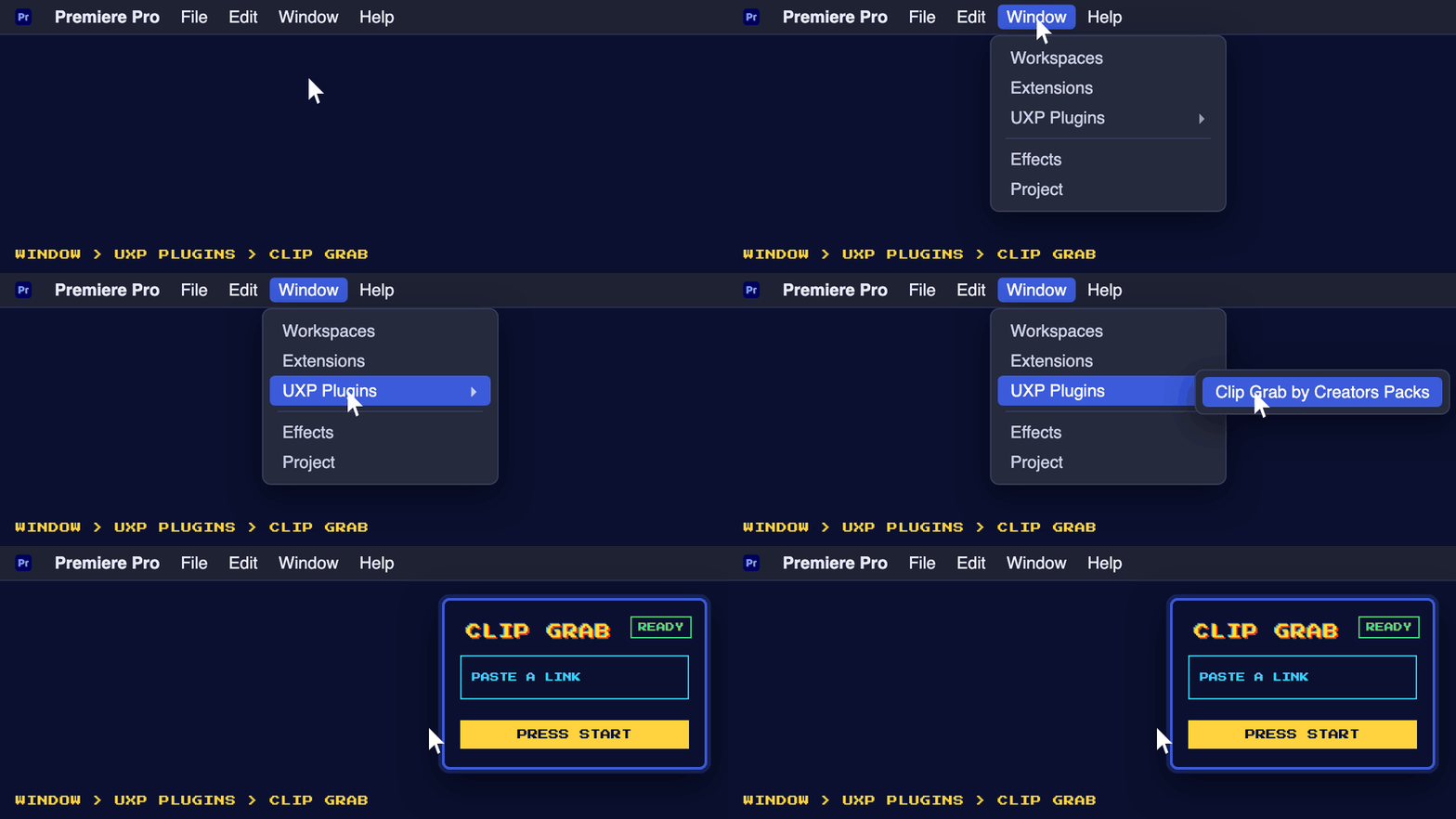
Premiere Pro
Open a project, then .

DaVinci Resolve Studio
Open a project, then .
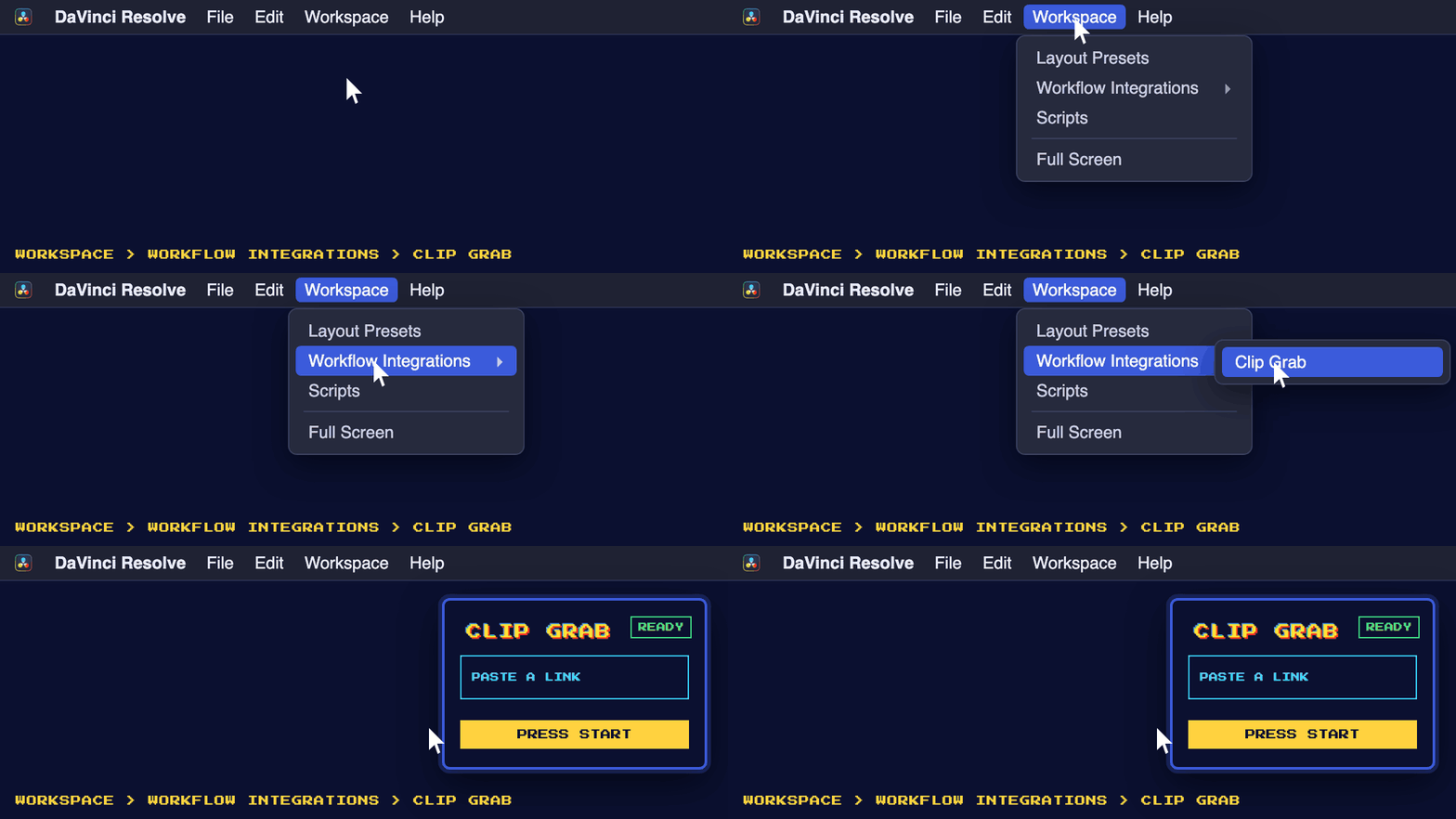
Free DaVinci Resolve
opens Clip Grab in your browser. When a clip is done, brings it into your Media Pool.
3. GRAB YOUR FIRST CLIP
Check the light says READY
Top right of the panel.
Paste a link
Copy a video link, then click PASTE (or drop it in the box).
Trim and press START
Drag the in and out points to the part you want and press PRESS START. The clip lands in your project's Clip Grab bin.
SOMETHING NOT WORKING?
Clip Grab isn't in the menu
Quit Premiere Pro or Resolve completely and open it again. Premiere: make sure you're on Premiere Pro 2025 or newer. Still missing? Run the installer again; it's the usual fix and keeps your plan.
The light says OFFLINE instead of READY
Mac: open Clip Grab Helper from your Applications folder, and check has Clip Grab switched on. Windows: restart your computer once. Then click the light to try again.
A link won't download
Click HOW TO FIX under the error. Private or members-only videos need you to be signed in to that site in your browser.
I bought Clip Grab Pro. How do I switch it on?
If you bought inside the panel, it switches on by itself. Bought on the website? Click the plan tag at the top of the panel, choose Activate and paste the key from your email. No email? Check spam, or use CHECK FOR MY PURCHASE.
UNINSTALL
Mac: open Uninstall Clip Grab from your Applications folder and click Remove Clip Grab.
Windows: .
Your downloaded clips stay where they are, and your licence is kept in case you reinstall.
Still stuck? Email support@creatorspacks.com and we'll sort it out.
Clip Grab by Creators Packs · creatorspacks.com